![php[architect] logo](/wp-content/themes/phpa/images/new_logo_mark_nav.png)

Branching Workflows: Choosing the Right Git Strategy for Your Team
Video version at: https://youtu.be/R_-NG_frTiw
Last month, two developers on a team I was working with both merged their branches to main within minutes of each other. The first merge was fine but the the second introduced a conflict in a shared service class that nobody caught until the CI pipeline deployed a broken build to production.
The team scrambled to fix it, but while they were debugging, a customer reported a billing bug in production. The hotfix for that billing bug couldn’t go out cleanly because the broken feature code was already tangled into main. What should have been a 1-minute rollback turned into a two-hour fire drill.
After a lengthy discussion, it was determined that the root cause wasn’t the conflict itself. Instead, it was agreed that the teams’ branching workflow, or lack thereof, was the culprit. Everyone was merging to main whenever they felt like it, with no structure around releases, hotfixes, or feature isolation.
In this article, we’re going to discuss different branching workflows and how your team (even if you’re a team of one with an AI assistant) can take advantage of them.
Git Flow: The Structured Approach
Git Flow is built around two long-lived branches and several short-lived supporting branches, and it works well for teams that ship versioned releases on a schedule, like a PHP library, a product with release cycles, or if you need to do a lot of manual testing before a release.
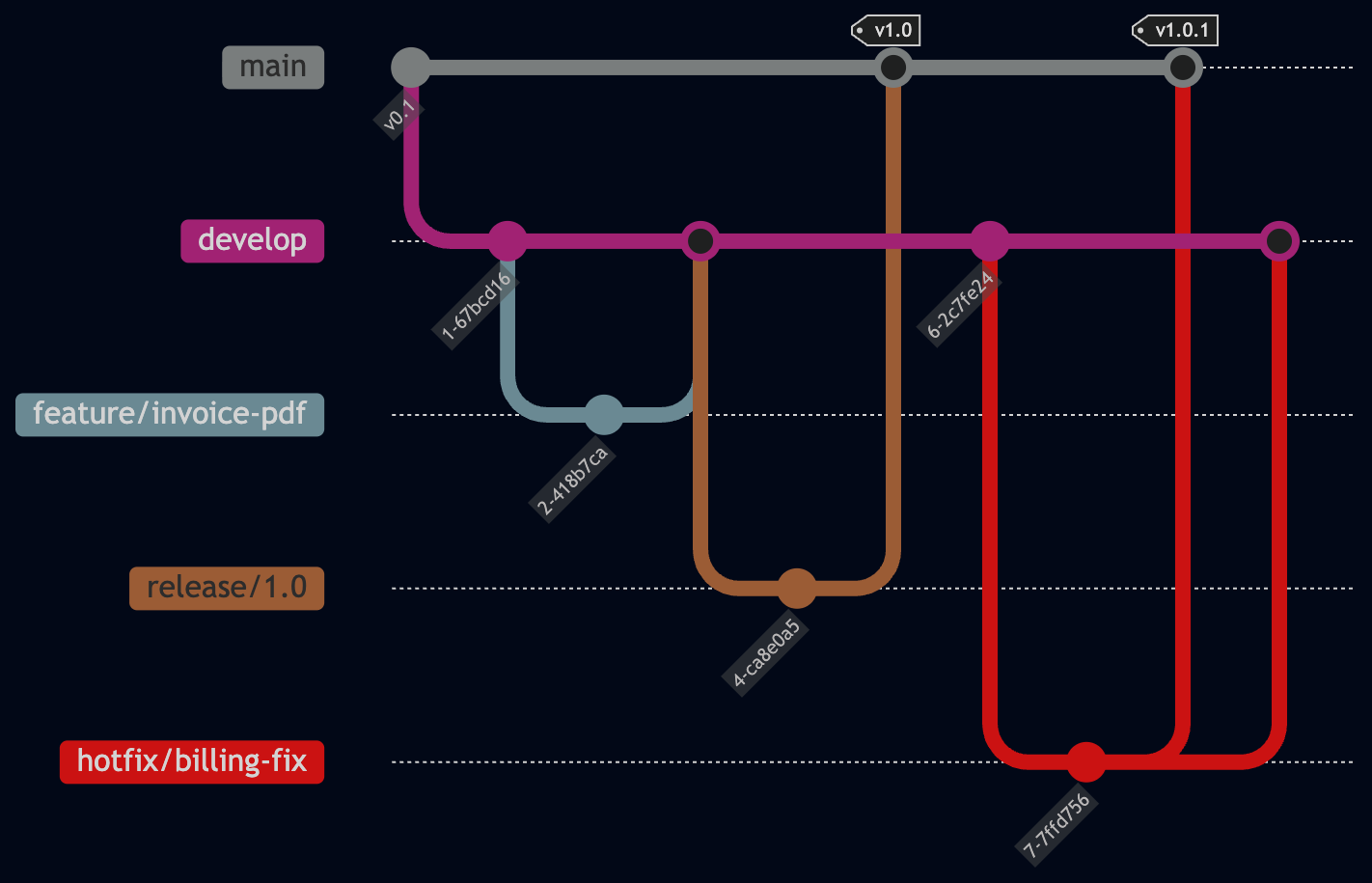
The main branch always reflects what is running in production. The develop branch is where completed features accumulate before a release. Feature branches come off develop and merge back into develop when done.
A typical feature looks like this:
# Start a new feature from develop
git checkout develop
git pull origin develop
git checkout -b feature/invoice-pdf

# Do your work, commit along the way
git add src/Invoice/PdfGenerator.php
git commit -m "Add PdfGenerator class for invoice exports"

# When the feature is complete, merge back to develop
git checkout develop
git pull origin develop
git merge feature/invoice-pdf
git push origin develop

# Clean up
git branch -d feature/invoice-pdf
When the team is ready to ship, they create a release branch from develop:
# Create a release branch
git checkout develop
git checkout -b release/1.2

# Fix any last-minute issues on the release branch
git commit -m "Bump version to 1.2.0"

# Merge into main and tag it
git checkout main
git merge release/1.2
git tag -a v1.2.0 -m "Release 1.2.0"

# Merge back into develop so it has the version bump
git checkout develop
git merge release/1.2
If a production bug needs an emergency fix, a hotfix branch comes directly off main and merges back into both main and develop, so the fix exists in both places.
Git Flow gives you a lot of control, but it comes with overhead. You’re managing multiple long-lived branches and merge paths, which means more process for your team to follow. That being said, you might need to support multiple versions of your software, and this is an excellent way to do so.
We’ll have more about branching workflows after this word from our partners.
GitHub Flow: One Branch, Keep It Simple
GitHub Flow strips branching down to the minimum in that you have one long-lived branch (main) and short-lived feature branches.
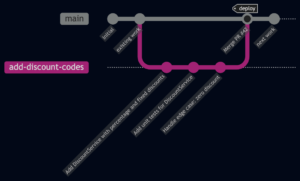
It commonly looks like the following:
- Create a branch from
main - Make your changes and commit
- Open a pull request
- Get a code review
- Merge to
main - Deploy
Or in command lines:
# Start a feature
git checkout main
git pull origin main
git checkout -b add-discount-codes

# Work and commit
git add src/Discount/DiscountService.php
git commit -m "Add DiscountService with percentage and fixed discounts"

# Push and open a pull request
git push -u origin add-discount-codes
# Open PR on GitHub, get review, then merge via the UI
After the merge, main is deployed, automatically if possible.
The nice thing about this is that there’s no develop branch, no release branch, no version tags unless you want them. It makes it MUCH easier to manage the state of your Git repository, but it really is best if you only have one version of your codebase deployed.
GitHub Flow works well for teams practicing CI/CD, where every merge to main goes straight to production. Many PHP teams deploying Laravel or Symfony applications use this workflow because their release cadence is “whenever a feature is ready.”
The tradeoff is that main must always be deployable. If someone merges broken code, it goes to production. Your CI/CD pipeline and test suite need to catch problems before the merge happens, not after.
Trunk-Based Development: Small Changes, Often
Trunk-Based Development (TBD) takes the GitHub Flow idea further. Developers make small, frequent commits to main (the “trunk”), multiple times per day. Feature branches live for hours or less if possible.
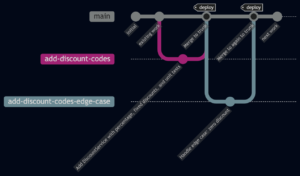
A common misconception is that TBD means “no branches ever.” Developers still create short-lived branches for pull requests. The difference is that those branches get merged within a day, not left open for a week.
Features that take longer than a day to build are handled with feature flags:
<?php
// In your controller or service
if (FeatureFlag::isEnabled("new-checkout-flow")) {
    return $this->newCheckoutProcess($cart);
}

return $this->legacyCheckoutProcess($cart);
With feature flags, you can merge incomplete features into main without exposing them to users. The code is in production, but the flag keeps it hidden until the feature is finished and tested. When you’re ready, you flip the flag, and the feature goes live without a deployment.
The git commands for TBD are almost identical to GitHub Flow:
git checkout main
git pull origin main
git checkout -b short-lived/checkout-step-one

# Small, focused change
git add src/Checkout/ShippingCalculator.php
git commit -m "Add ShippingCalculator for new checkout flow (behind flag)"
git push -u origin short-lived/checkout-step-one

# Open PR, get quick review, merge same day
TBD requires a high level of discipline and good automated testing. If your test suite takes 45 minutes to run, merging multiple times a day becomes harder. Teams using TBD typically invest heavily in fast CI pipelines and comprehensive test coverage.
Choosing the Right Workflow
Choosing the right workflow can be a real challenge; it depends on your release process, your team size, and how mature your deployment setup is.
If your project ships numbered versions or on a regular cadence, then Git Flow works. That’s teams maintaining a PHP package on Packagist, or shipping a new version every two weeks with a formal QA cycle. You need the structure to manage concurrent development and release preparation, and Git Flow gives you exactly that.
If your team deploys continuously and every merge goes to production, GitHub Flow is the better match. Most web application teams, especially those running Laravel or Symfony apps, fall here. Releases happen whenever a feature is ready, not on a calendar. For smaller teams (two to eight developers) with an automated deployment pipeline, GitHub Flow removes overhead without introducing risk.
Trunk-Based Development makes sense when your team has fast test suites, strong CI/CD practices, and a habit of making small, incremental changes. It works especially well for larger teams where long-lived branches would generate constant merge conflicts. The tradeoff: you need to invest in testing infrastructure and feature flags upfront. If your tests take 45 minutes to run, merging multiple times a day is painful before you fix that problem.
Gotchas
As with all things that involve squishy humans, there are some potential gotchas with this.
If half your team thinks you’re doing GitHub Flow and the other half are creating develop and release branches, you’ll end up with a confusing mess. Document your workflow in your project’s README or CONTRIBUTING file, or enforce it using protected branches. This sounds obvious, but it gets skipped constantly.
Long-lived feature branches cause problems in any workflow. The longer a branch lives, the more it diverges from main, and the harder the merge becomes. Rebase or merge main into your feature branch at least once a day to keep conflicts small.
Watch out for “it’s just a small change” commits bypassing the process. Small changes can still break things. A one-line typo in a change can take down the global economy as your “quick fix” causes millions of computers to reboot over and over again. Keep your review process consistent regardless of the change size.
What You Need To Know
- A branching workflow is an agreed-upon set of rules for how your team creates, names, and merges branches.
- Git Flow uses
main,develop,feature,release, andhotfixbranches. It fits teams with scheduled, versioned releases. - GitHub Flow is
mainplus short-lived feature branches and pull requests. Deploy on every merge. - Trunk-Based Development means very short-lived branches (merged within a day) with feature flags to hide incomplete work.
- Pick the workflow that matches your release cadence and CI/CD maturity. Write it down somewhere.